Yesterday I learned that AI infrastructure is fundamentally about managing expensive compute resources.
That led me to a practical question:
How does Kubernetes even know a GPU exists?
For CPUs and memory, Kubernetes can discover resources directly from the node.
GPUs are different.
A GPU isn’t automatically visible to Kubernetes.
There is an extra layer that makes everything work.
The Journey from GPU to Pod Link to heading
The path looks like this:
GPU Hardware
      ↓
NVIDIA Driver
      ↓
Device Plugin
      ↓
Kubernetes Node
      ↓
Pod Requests GPU
Let’s break it down.
Step 1: The GPU Exists on the Machine Link to heading
The physical GPU is attached to a worker node.
However, Kubernetes doesn’t interact with the hardware directly.
Instead, the operating system exposes the GPU through vendor-specific drivers.
For NVIDIA GPUs, this means installing the NVIDIA driver on the node.
Without the driver, the operating system itself cannot use the GPU.
Step 2: Kubernetes Still Can’t See It Link to heading
Even after installing the NVIDIA driver, Kubernetes remains unaware of the GPU.
Why?
Because Kubernetes only understands resources that are registered with it.
It knows about:
- CPU
- Memory
- Storage
But it has no built-in understanding of GPU hardware.
Something must tell Kubernetes:
“This node has 4 GPUs available.”
That’s where device plugins come in.
Step 3: Enter the Device Plugin Link to heading
A Device Plugin is a Kubernetes component that advertises specialized hardware resources to the kubelet.
For NVIDIA GPUs, the NVIDIA Device Plugin runs on each GPU node and reports available GPUs.
Once registered, Kubernetes sees something like:
nvidia.com/gpu: 4
Now GPUs become first-class schedulable resources.
This was the key insight for me.
Kubernetes doesn’t schedule GPUs because it understands GPUs.
It schedules GPUs because a Device Plugin exposes them as resources.
Step 4: Pods Can Request GPUs Link to heading
After registration, workloads can request GPUs just like they request CPU and memory.
For example:
resources:
  limits:
    nvidia.com/gpu: 1
When Kubernetes sees this request, it only schedules the Pod onto nodes that have an available GPU.
The scheduler doesn’t care whether the workload is running an LLM, image generation model, or training job.
It simply matches resource requests with available resources.
Why This Matters Link to heading
This design is actually elegant.
Kubernetes doesn’t need special logic for every hardware accelerator.
The same mechanism can expose:
- GPUs
- TPUs
- FPGAs
- SmartNICs
- Other accelerators
As long as a Device Plugin exists, Kubernetes can schedule it.
This keeps the core scheduler generic while allowing vendors to integrate specialized hardware.
My Biggest Takeaway Link to heading
The biggest lesson today was realizing that GPUs are not magical objects inside Kubernetes.
From Kubernetes’ perspective, a GPU is simply another resource that can be advertised, requested, and scheduled.
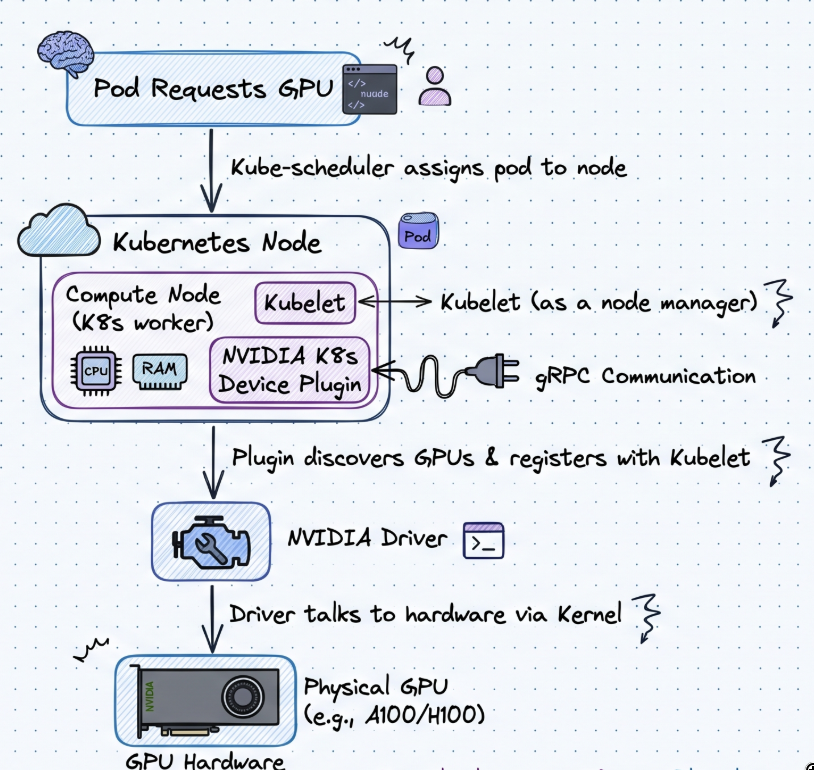
The real magic happens in the Device Plugin layer.
Understanding this makes AI infrastructure feel much less mysterious.
It’s still Kubernetes.
Just with more expensive resources.
So, Today I learned how Kubernetes discovers GPUs.
Tomorrow I’ll look at a more practical problem:
How do we avoid wasting them?
We’ll explore GPU sharing, resource fragmentation, and why keeping GPUs busy is one of the hardest problems in AI infrastructure.
Stay tuned for Day 3.