In Day 3, I learned that GPU utilization is one of the biggest challenges in AI infrastructure.
That led me to another question:
Why can’t Kubernetes scheduling alone solve this problem?
After all, Kubernetes has been scheduling workloads for years.
The answer is that AI workloads have very different requirements from traditional applications.
Traditional Scheduling Link to heading
A typical application might look like this:
Frontend
   ↓
Backend
   ↓
Database
Each component can run independently.
If one Pod starts a few seconds later than another, everything still works.
Kubernetes is very good at scheduling these workloads.
AI Training Is Different Link to heading
Consider a distributed training job.
Instead of needing one GPU, it may require:
- 8 GPUs
- Across multiple nodes
- At the same time
For example:
Training Job
├── GPU 1
├── GPU 2
├── GPU 3
├── GPU 4
├── GPU 5
├── GPU 6
├── GPU 7
└── GPU 8
If only 6 GPUs are available, the job cannot start.
Allocating partial resources is useless.
This is very different from traditional applications.
The Gang Scheduling Problem Link to heading
This leads to a concept called Gang Scheduling.
The rule is simple:
Either schedule all required resources together or schedule none of them.
Imagine booking seats for a group of 8 friends.
Getting only 6 seats isn’t helpful.
AI training jobs work the same way.
They need all GPUs before they can begin.
Topology Matters Too Link to heading
With CPUs, the exact placement often doesn’t matter much.
With GPUs, it does.
Suppose:
Node A → 4 GPUs
Node B → 4 GPUs
Scheduling all GPUs on the same node may be faster than spreading them across multiple nodes.
Why?
Because GPUs constantly exchange data during training.
The network becomes part of the performance equation.
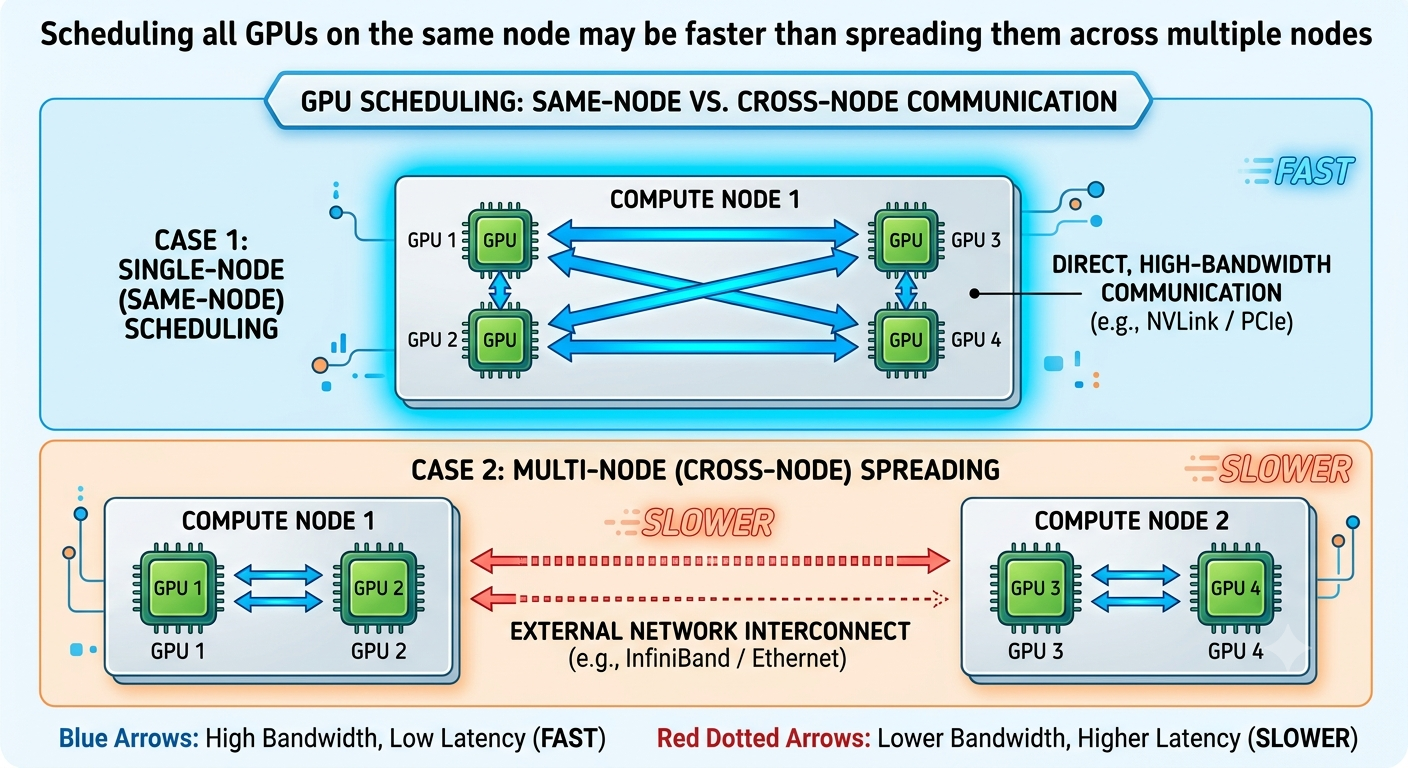
This is called topology awareness.
The scheduler needs to understand not just available resources, but where those resources are located.
Why AI Schedulers Exist Link to heading
This is why the AI ecosystem has developed specialized schedulers and extensions.
Their job is to answer questions such as:
- Can all GPUs be allocated together?
- Which placement minimizes communication cost?
- Which node topology is optimal?
- How do we maximize utilization while avoiding starvation?
These problems rarely exist in traditional microservices.
How The Ecosystem Solves This Link to heading
Several tools extend Kubernetes to handle AI scheduling challenges:
Volcano Link to heading
A Kubernetes-native batch scheduler designed for AI and HPC workloads.
Key features:
- Gang Scheduling
- Queue management
- Fair-share scheduling
- Batch workload support
This is one of the most common solutions for distributed training jobs.
Kueue Link to heading
A Kubernetes SIG project for job queueing and admission control.
Instead of immediately scheduling workloads, Kueue can:
- Queue jobs
- Reserve resources
- Admit jobs only when enough resources are available
Useful for shared GPU clusters.
Kubeflow Training Operator Link to heading
Used to run distributed training workloads such as:
- PyTorch
- TensorFlow
- XGBoost
Works with schedulers like Volcano to ensure all required resources are available.
Ray Link to heading
Ray introduces another layer above Kubernetes.
Kubernetes schedules infrastructure.
Ray schedules distributed computation.
We’ll dive deeper into Ray tomorrow.
NVIDIA GPU Operator Link to heading
Not a scheduler itself, but an important component that manages:
- GPU drivers
- Device plugins
- Monitoring
- GPU lifecycle management
Making GPUs easier to operate at scale.
Today’s Takeaway Link to heading
Scheduling a web application is mostly about finding available resources.
Scheduling AI workloads is about finding the right resources at the right time and in the right place.
That’s why concepts like:
- Gang Scheduling
- Topology Awareness
- Co-scheduling
have become important in AI infrastructure.
Tomorrow I’ll explore a tool that appears almost everywhere in modern AI systems:
Ray
And why Kubernetes alone isn’t enough for distributed AI workloads.
References Link to heading
- Volcano — https://volcano.sh
- Kueue — https://kueue.sigs.k8s.io
- Kubeflow Training Operator — https://www.kubeflow.org/docs/components/training
- Ray — https://www.ray.io
- NVIDIA GPU Operator — https://docs.nvidia.com/datacenter/cloud-native/gpu-operator